A cloud kitchen is a commercial kitchen that cooks only for delivery and pickup. There's no dining room, no tables and no front-of-house team. Every order comes in through an app or your own ordering page and goes out in a courier's bag. You'll also hear it called a ghost kitchen, dark kitchen or virtual kitchen. Plenty of people search for it by the name CloudKitchens, which is an actual company, so that comes up here too, along with how renting works, what to check before you sign and how to keep service steady once orders start.
Ghost, dark and virtual: one kitchen, several names
The names mostly mean the same thing: a kitchen with no guests inside. The distinction that does matter is between the kitchen and the brand. The cloud kitchen is the space. A virtual brand is a menu and a name that exists only on delivery apps and your own ordering page.
So one kitchen can cook for several brands at once, say a burger concept and a dessert line, each with its own listing and its own customers. An ordinary restaurant can also launch a virtual brand from its existing kitchen without renting anything. If you already have a kitchen with spare hours, try the brand there before you pay for a second space.
Is CloudKitchens legit, and who runs it?
CloudKitchens is a real company, and one of the better-known landlords in this model, which is why its name often stands in for the whole category. According to its Wikipedia entry, it's based in Los Angeles, was established in 2016 by Diego Berdakin and Sky Dayton with a first facility in Los Angeles, and was later acquired by Travis Kalanick, Uber's cofounder. It's operated by City Storage Systems.
Who holds the CEO title can change, so check the company's LinkedIn page for the current answer instead of trusting an article. The company's own site describes the product as a private kitchen inside a facility built for delivery, pickup and food production.
Being a legitimate company doesn't make it the right fit for your business. What decides your money is the lease: the term, what the monthly fee covers and what happens if you leave early. Read those lines the way you would for any commercial space.
Is CloudKitchens doing well?
There are two public signals. The company's website says it's trusted by 600+ brands, which is its own figure. Its LinkedIn page also reshared an announcement of a $1.7B equity investment in Atoms, led by Andreessen Horowitz.
Neither one tells a tenant whether a particular kitchen turns a profit. A landlord that's growing and a tenant that's making money are separate questions, and yours depends on your brand, your delivery radius and your food cost. With any provider, ask to talk to a current tenant running a similar concept, and ask how many of their orders come from apps versus their own channel.
Three ways to get a cloud kitchen
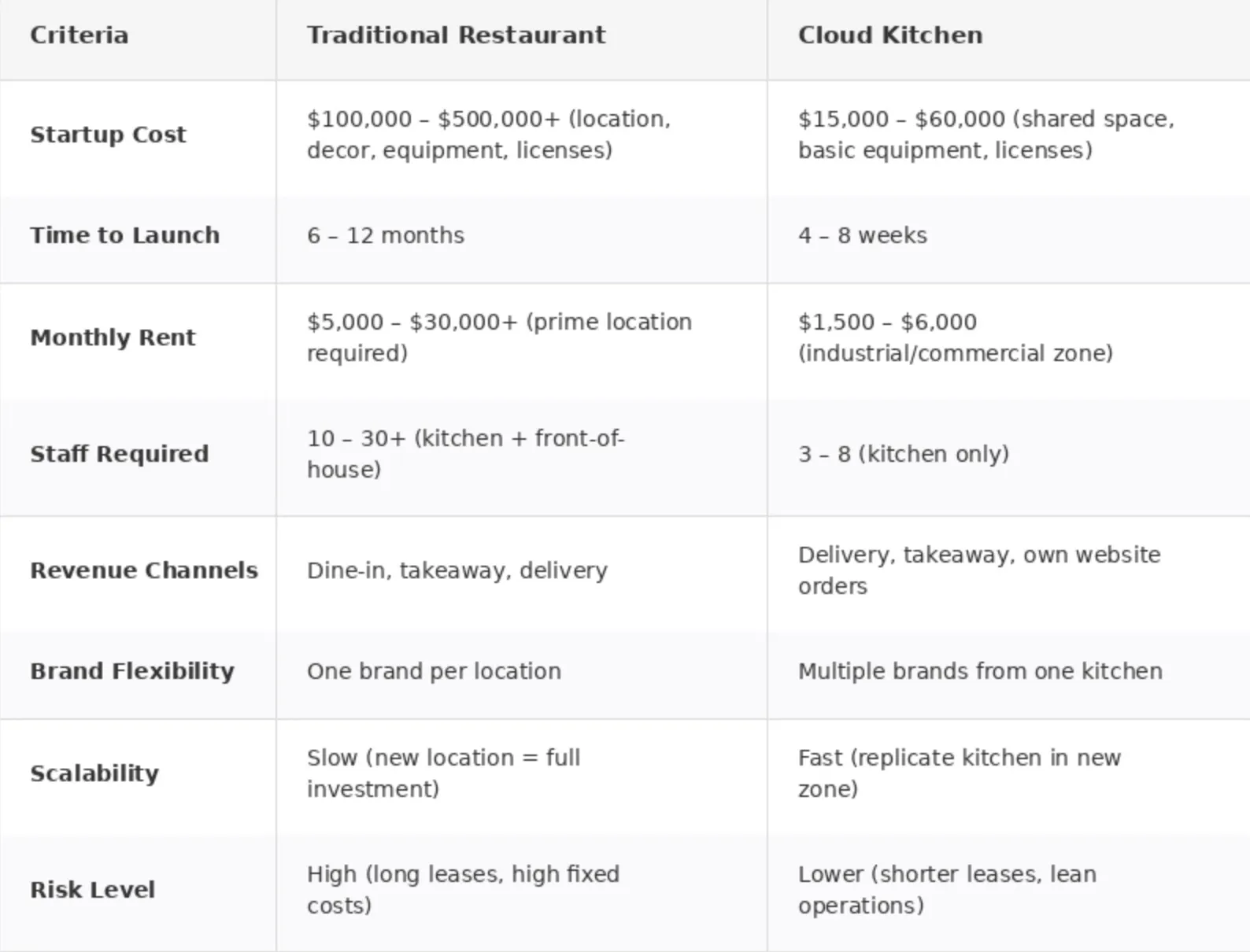
Prices swing a lot by city and by what's bundled in, and the figures that circulate online rarely say what they include. Get written quotes from each route for the same list of items, so you're comparing like with like.
What to ask before you sign a kitchen lease
See the space during a busy hour, not on a quiet viewing day. Look at the equipment you'll actually use, how ventilation is shared, whether cold storage is shared and who gets which shelves.
Then look at the map. A kitchen far from your delivery zones adds minutes to every order, and late, lukewarm food is the kind of thing customers complain about. Find out where couriers wait and pick up, and whether pickup has its own door or is a shared counter that jams when several brands peak together.
Finally, ask what the monthly fee leaves out: utilities, packaging, waste, extra storage, platform tablets. If you plan to run more than one brand, ask whether the second one costs extra.
A menu that survives the ride
Start with one cuisine and one kind of customer. Then cut whatever doesn't hold up in a box: dishes that go soggy, collapse or have to be eaten within minutes. A delivery menu is often smaller than the dine-in version of the same food, and that tends to be easier to cook at speed.
Check margins dish by dish. Platform commission is a percentage of each order, and the exact figure is in your contract with each platform, so put it into your food cost sheet before you set prices. A dish with a thin margin in the dining room can lose money once commission and packaging come off.
Your own ordering channel next to the apps
With no storefront, your menu is the whole shop window, so photos and clear descriptions have to do what a server does at the table. Most kitchens get their first orders through the apps. Orders on your own page don't carry the platform's commission, but they do carry payment processing and the cost of getting guests to that page, so think of it as a second channel you have to build, not a free one.
In FineDine, Menu Builder reads a photo, PDF, Excel or CSV of your existing menu and turns it into a digital menu, and AI Media Studio can enhance an existing dish photo with presets such as steam and garnish. AI generations use credits. Orders > Ordering Settings has a Delivery & Pick-Up channel with delivery fee, delivery time, minimum order amount and pre-order options, and online payment there goes through a provider you connect from the Marketplace. Each menu also shows channel tags for Delivery and Pick-Up.
Running service once orders start
The crunch in a cloud kitchen is several tickets from several apps landing at once, with the same two or three cooks on the line. Track preparation time against the pickup time you promised: when a dish runs late, the courier waits and the food sits before it reaches the customer. FineDine's item editor has a Preparation Time field and a Mark as Sold Out switch on each item, so when an ingredient runs out the dish comes off your own menu in one step.
For the weekly look back, FineDine IQ (AI Reports) shows revenue, orders and average ticket, and its Menu Performance tab breaks it down by item. Read it before you change prices or drop a dish. On the waiting side of service, see reducing guest wait time, and for the wider picture, restaurant industry trends.
If you own the space and want to rent it out
Some people arrive with the opposite problem: a kitchen to let and no tenant. Anyone who runs a brand will check the same things covered above, so have the answers ready: the equipment list, ventilation and cold storage arrangements, courier access for pickup and how close you are to dense delivery areas. They'll want those before they talk about rent.
| Route | What you get | What to confirm |
|---|---|---|
| Station in a shared kitchen facility | A private cooking station, often with equipment and ventilation, inside a building made for delivery brands | What's included in the fee, how pickup works, shared cold storage |
| Standalone commercial kitchen | A whole space under your control | Who supplies equipment, utilities and maintenance, lease length |
| Build your own | A kitchen designed around your menu and volume | Build cost and timeline, permits, whether volume will justify it |
Frequently Asked Questions
- Can I run a cloud kitchen from my existing restaurant kitchen?
- Yes. Some operators launch a virtual brand from a kitchen they already have, with a separate name and menu on delivery apps. It costs the least to try, since you aren't renting anything new, and it shows whether a delivery-only concept sells before you commit to another space.
- Does a cloud kitchen need its own website?
- It needs somewhere to take direct orders if you want to lean less on the apps. FineDine's AI Website Builder can generate a restaurant site from a prompt, and it works best when the menu and venue information are set up first.
- Can FineDine take delivery and pickup orders for a cloud kitchen?
- Its Orders section has a Delivery & Pick-Up channel with delivery fee, delivery time, minimum order and pre-order settings. Online payment there needs a payment provider connected through Integrations.
- How should I split orders between apps and my own channel?
- Use both. The apps put you in front of new guests, and your own channel avoids platform commission on guests who come back. Look in your contracts for the commission figure and whether it includes courier delivery. Then set it against the payment processing and promotion costs of your own page, plus delivery for direct orders, which you arrange and pay for separately.